Electrochemical Impedance Spectroscopy

The EIS Platform
Built by a
Researcher,
for Researchers

Real-time circuit simulation. Rigorous parameter fitting. Bayesian uncertainty quantification. Kramers–Kronig validation. All in one free desktop application — no Python, no license fees, no friction.

<10⁻¹²% error · clean data
12/12benchmark tests passed
Freefor all researchers
DOI citable · zenodo record
ZScope — Randles fit · Rs=10.0Ω · Rct=200.0Ω · Cdl=20μF
Nyquist — Z″ vs Z′
Z′ (Ω)
Fit Parameters (95% CI)
Rs10.0 Ω ±0.037
Rct199.5 Ω ±0.72
Cdl19.96 μF ±0.09
χ²red2.18×10⁻⁴
RMSE3.42 Ω · 1.83%
KK Valid DE+TRF MCMC ✓
Bode — |Z| & Phase
|Z| θ
Residuals — Rel. Error %
log(f / Hz)
Origin

Built from a
Real Experiment

ZScope was not designed in the abstract. It grew from a specific analytical problem — and the frustration of having no good tool to solve it.

Distribution & transparency ZScope is released as a standalone Windows installer. Source code is not publicly distributed. Full scientific documentation, validation benchmarks, and a comprehensive in-app help manual are provided so you can trust what happens inside.

During an electrochemical study, I needed to measure a baseline EIS spectrum at the start of a reaction — then capture six more spectra at different oxidation states as the process progressed. Each spectrum represented a distinct state of the system. Together, they were meant to tell the story of a mechanism evolving in time.

The analysis became a frustration. Working through seven spectra individually with existing tools was slow, disjointed, and offered no intuitive sense of how parameters were changing across the series. There was no way to visually explore how Rct grew, or how the Warburg tail shortened, from one state to the next.

"What if I could draw a circuit, move a slider, and watch the simulated Nyquist plot respond in real time — overlaid directly on my experimental data?"

Not as a fitting tool. As a lens for understanding — a way to arrive at physically motivated starting parameters, and to build the intuition that makes EIS more than empirical curve-fitting. That became the first version of ZScope: a real-time EIS simulator with a visual circuit canvas.

As the tool took shape, it grew. The fitting engine followed — built with the same insistence on physical transparency. Then Bayesian uncertainty quantification, because a parameter value without an honest uncertainty estimate has limited scientific value. Then structured data validation, custom component design, algorithmic circuit suggestion, and publication-ready reporting.

ZScope is the tool I needed during that experiment. It is completely free, and I hope it saves other researchers the same frustration — and gives them something genuinely better in its place.
Scientific Capabilities

Everything in One Place.
Nothing Missing.

Six tightly integrated capabilities covering the full EIS analysis workflow — from raw data validation through parameter extraction to uncertainty quantification and publication-ready reporting.

01

Real-Time Circuit Simulation

Draw a circuit, adjust a parameter, and the Nyquist, Bode, and Phase plots update instantaneously — with your experimental data overlaid. This is the feature that started ZScope, and it remains its most distinctive capability. Physical intuition that no optimizer can provide.

Live CanvasOverlay DataPresetsNotation I/O
02

Hybrid Global Fitting Engine

A three-stage optimizer: Latin Hypercube Sampling for space-filling coverage, Differential Evolution for multimodal landscapes, and Trust-Region Reflective for gradient-precise convergence. Modulus-weighted χ² with Soft-L1 robust loss. Automatic warm-start for sequential measurements cuts compute time by 60–80%.

DE+TRFLHS Multi-startSoft-L1AIC/BIC
03

Bayesian MCMC Uncertainty

The emcee affine-invariant ensemble sampler maps the full posterior P(θ | Zexp). 95% credible intervals — probability-direct, not frequentist approximations. Parameter correlation matrix, Gelman–Rubin convergence, and predictive uncertainty bands across all spectra.

emceePosterior PDF95% CIR̂ Diagnostic
04

Kramers–Kronig Validation

One keystroke (Ctrl+K). The linear KK test produces a quantitative residual map in under 2 seconds, pinpointing which frequency regions violate linearity, causality, or stationarity. An essential quality gate before any parametric analysis. KK-aware proposal filtering flags circuit suggestions when data quality is insufficient.

lin-KKResidual MapQuality Gate
05

Custom Element Designer

Define any Z(ω) or Y(ω) expression in a graphical interface — set parameter bounds, log/linear scaling, and draw a custom canvas symbol. Export as .json to share with colleagues. Registered elements participate fully in fitting, simulation, and reporting with no coding required.

GUI DesignerJSON I/OFull FittingNo Code
06

Publication-Grade Reporting

Complete fit reports: parameter tables with confidence or credible intervals, χ², χ²_red, RMSE, R², AIC, BIC, frequency-resolved residuals, and parameter correlation matrix. Export figures as PNG (1920×1080), SVG, or PDF. Reports in .txt, .csv, .json, or full HTML/PDF.

χ²/AIC/BICPNG/SVG/PDFCSV/JSON
See It in Action

Five Moments That
Tell the Whole Story

Each piece of media below captures one specific capability that no other free EIS tool can demonstrate. Replace each placeholder with your recording when ready — the layout and captions are already designed around what you'll capture.

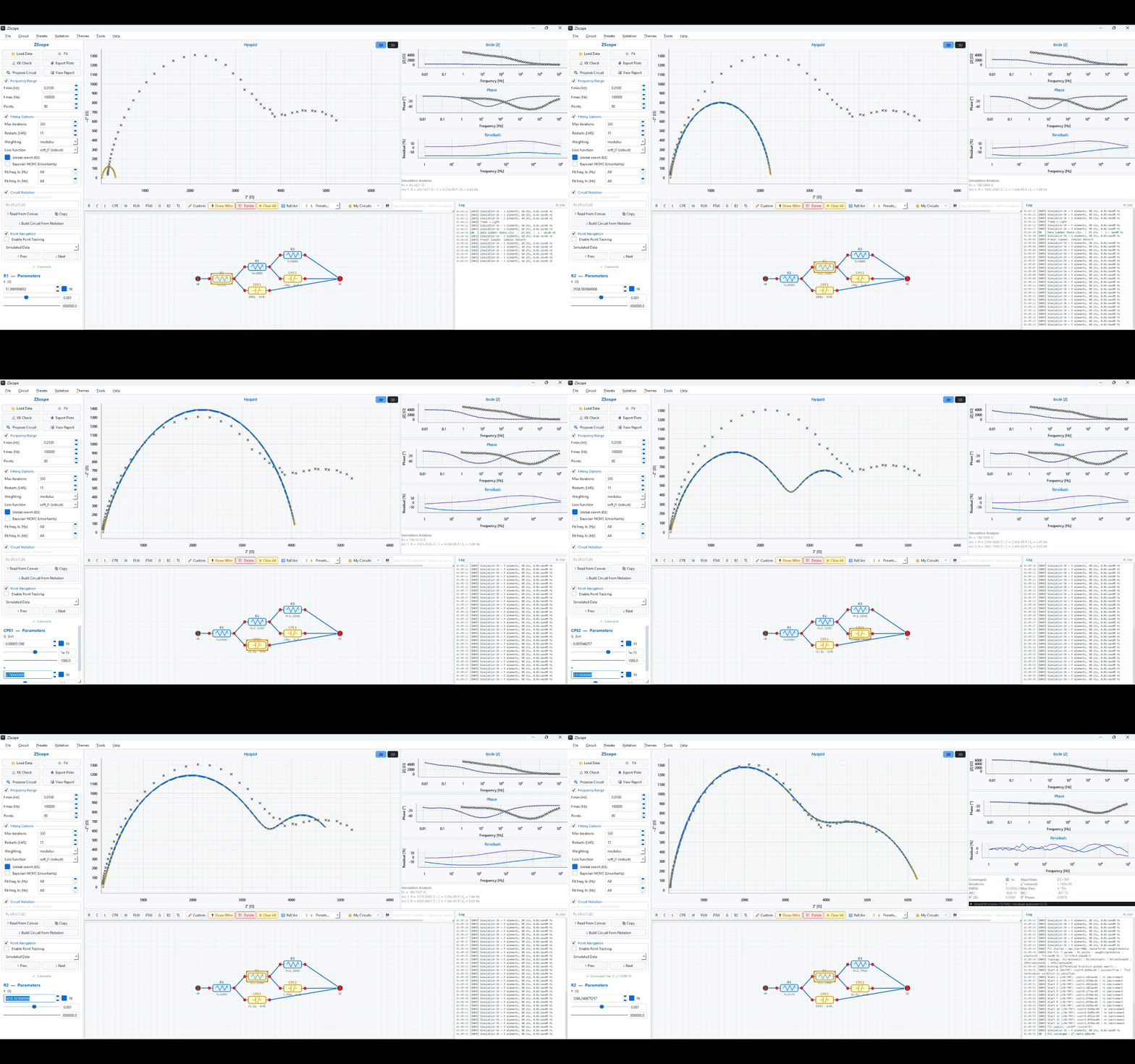
Live circuit simulation: adjusting Rct and CPE parameters with real-time Nyquist plot update
The moment it creates

"I've never seen an EIS tool do this in real time."

Live circuit simulation

This is the feature ZScope was born from. Move a slider — the Nyquist arc responds instantly, chasing the experimental data. The depression angle changes as CPE α moves. The arc grows as Rct increases. Watching this for 10 seconds builds more intuition than any textbook page.

1 Load data, build CPE-Randles, zoom to Nyquist + canvas only
2 Slowly drag Rct too small → too large → perfect
3 Then drag CPE α from 1.0 → 0.7 — show the arc flatten
ScreenToGif · 15fps
Video — 90 seconds
Record: Import → KK (show green residuals) → Build circuit → Fit → MCMC → Export report — full pipeline, no voiceover
Video · 90 s
The moment it creates

"I could run my own data through this tomorrow."

Complete workflow — start to publish

One unnarrated screen recording, 90 seconds, complete pipeline. Add chapter title overlays ("1 — Import", "2 — KK", etc.) using free Windows Clipchamp. Linger 2 s on the green KK residual map — that single moment signals more scientific rigour than any text description can.

1 Rehearse twice. Use a dataset you know fits cleanly
2 Pause 1.5 s on every result before moving on
3 Add chapter text with Clipchamp (free, Windows 11)
OBS Studio · 1920×1080 · 30fps
Screenshot
MCMC corner plot — CPE-Randles, show Q–α correlation
Screenshot

Bayesian posteriors

Full corner plot from a CPE-Randles fit. The off-diagonal Q–α correlation is the best image to use — it shows honest parameter identifiability, not a hidden problem.

Run MCMC on CPE-Randles · Wait for R̂ < 1.1 · Screenshot the full corner plot panel
GIF — ~20 seconds
Custom element designer: write formula → draw symbol → save → element appears in toolbar
GIF

Custom element designer

Define a new Z(ω) expression, draw its canvas symbol with the vector editor, save — and watch it appear live in the toolbar. No coding. No other free EIS tool offers this.

Open Custom Component dialog · Write a simple formula · Draw a symbol · Click Save & Register · Show it in the toolbar
Screenshot · Side by side
Dark theme left · Light theme right — same circuit, same data, both themes
Screenshot

Dark & light themes

A simple side-by-side of both themes answers the first question every new user has before downloading. 5 minutes to make — toggle in Settings, screenshot each.

Settings → Theme toggle · Screenshot dark · Screenshot light · Combine side-by-side in any image editor
Production tip: All five recordings can be made in under 3 hours using one real dataset from your original experiment. Use ScreenToGif (free) for GIFs, OBS Studio (free) for the video, and Windows Snipping Tool for screenshots. Replace each placeholder by swapping the <div class="sia-placeholder"> with an <img src="..."> or <video autoplay muted loop> tag.
Recommended Workflow

From Raw Data to
Published Results

ZScope covers the complete EIS analysis chain in one application — no switching between tools at any step.

Import & Prepare

Auto-detect column format, cross-validate Re/Im vs Mag/Phase, filter rows, set frequency sub-bands, correct sign conventions.

Ctrl+O

Validate with KK

Confirm linearity, causality, and stationarity. Inspect the frequency-resolved residual map and identify any problematic spectral regions.

Ctrl+K

Build & Fit

Draw a circuit, pick a preset, or use algorithmic suggestion. Visually match simulation to data, then run DE+LHS+TRF fitting.

F5

Quantify Uncertainty

Run Bayesian MCMC for full posteriors, credible intervals, parameter correlations, and convergence verification.

Ctrl+M
Validation & Benchmarks

Tested Against
Known Ground Truth

All benchmark results derive from synthetic data with known parameters. Four circuits × three noise levels = 12 test cases. All 12 converged. Results are reproduced in full in the benchmarks/ directory.

Clean Data — Parameter Error

<10⁻¹²%
Machine-precision recovery for all 4 circuits on noiseless data. χ²_red ≈ 0 in all cases. Confirms the solver and optimizer are mathematically exact.
12/12 parameters · Algorithm: DE+TRF

2% Gaussian Noise — RMSE

1.68–1.74%
All parameters across all 4 circuits recovered within 1.22% of ground truth. Soft-L1 robust loss keeps RMSE well inside the noise level. No systematic bias observed.
Max individual error: 1.22% (R1 in Two-TC)

5% Gaussian Noise — Robustness

3.71–3.95% RMSE
Single-arc circuits recover all parameters within 1.75%. CPE.Q reaches 6.72% — expected and correctly flagged as an intrinsic Q–α correlation, not an optimizer failure.
CPE.Q: 6.72% (⚠ correlated — see note)

Computation Time

0.53–5.53s avg
80 frequency points. Randles: 0.53 s. CPE-Randles: 1.12 s. Two-TC: 2.68 s. All runs use DE+TRF global search — not the faster LHS-only mode.
All cases: full DE+TRF · 80 pts · Windows 11

RMSE by Circuit & Noise Level

Data from zscope_benchmark_results.json. Each group = one test circuit. All values are well below their respective noise floors.

Note on Two-TimeConstants at 5% noise: The Two-TC circuit (Rs–[R1/C1]–[R2/C2]) shows large individual parameter errors at 5% noise. However, the time constants τ₁ = R1·C1 and τ₂ = R2·C2 are recovered within ~4% — inside the noise level. The elevated errors arise from a parameter-swap degeneracy where R1/R2 exchange roles, producing an identical spectrum. ZScope v1.1 adds post-fit ordering to resolve this. At 2% noise, Two-TC already recovers correctly: R1 error 1.22%, R2 error 0.19%.
CSV Results Full Report
Scientific Methodology

The Mathematics
Inside ZScope

ZScope implements well-established electrochemical impedance theory. Every equation shown here is directly implemented in the solver and fitting engine.

Complex Impedance

$$Z(\omega) = Z'(\omega) - j\,Z''(\omega)$$

The complex impedance decomposes into real (resistive) and imaginary (reactive) parts. Plotted as $-Z''$ vs $Z'$, this gives the Nyquist representation. ZScope simulates this at every frequency point in real time.

Constant Phase Element

$$Z_\text{CPE}(\omega) = \frac{1}{Q\,(j\omega)^n}$$

The CPE generalizes ideal capacitors ($n=1$) for rough or heterogeneous surfaces. $\alpha = 0.5$ gives Warburg-like diffusion. ZScope fits both $Q$ and $n$ with physical bounds $0 < n \leq 1$.

Modulus-Weighted Objective

$$\chi^2 = \sum_{k=1}^{N} \frac{(Z'_k - \hat{Z}'_k)^2 + (Z''_k - \hat{Z}''_k)^2}{|Z_k|^2}$$

Modulus weighting normalizes each frequency's contribution across the full impedance range — the standard recommended by Boukamp (1986) for unbiased parameter extraction. Default in ZScope.

Warburg Diffusion

$$Z_W(\omega) = \frac{\sigma}{\sqrt{\omega}}\,(1 - j)$$

Semi-infinite Warburg produces the characteristic 45° tail. ZScope also implements FLW (finite, permeable boundary) and FSW (finite, blocking boundary) for bounded diffusion in batteries and fuel cells.

Bayesian Posterior

$$p(\boldsymbol{\theta}\mid\mathbf{Z}) \propto p(\mathbf{Z}\mid\boldsymbol{\theta})\,p(\boldsymbol{\theta})$$

The emcee ensemble sampler draws from the full posterior of circuit parameters $\boldsymbol{\theta}$ given measured spectra $\mathbf{Z}$. This reveals parameter correlations and non-identifiability that point estimates cannot show.

Kramers–Kronig Test

$$Z'(\omega) = R_\infty + \frac{2}{\pi}\int_0^\infty \frac{\xi\,Z''(\xi)}{\xi^2 - \omega^2}\,d\xi$$

The lin-KK method fits a superposition of RC elements to verify causality and linearity without assuming a circuit model. Frequency-resolved residuals pinpoint non-compliant spectral regions before any fitting begins.

Honest Comparison

Where ZScope Excels —
and Where It Doesn't

ZScope is a research-stage tool. We believe in transparency: here is an honest account of where it leads and where established tools have genuine advantages.

Feature ZView / EC-Lab Zfit (MATLAB) ZScope
Bayesian MCMC uncertainty Not available partial Full emcee posterior
Kramers–Kronig validation limited Not built-in lin-KK + residual map
Real-time interactive simulation limited Not available Instantaneous
Multi-start global optimization Local only Local only DE + LHS + TRF
Custom elements (no coding) limited Script-level GUI formula editor
Industry track record Decades, widely cited academic early-stage
Commercial support Dedicated team community direct author contact
Platform availability Windows / macOS Cross-platform Windows (macOS/Linux planned)
Free for researchers Commercial license Requires MATLAB Completely free

ZView and EC-Lab are mature, industry-standard tools with extensive validation histories and dedicated support teams. ZScope is a research-stage application offering modern Bayesian methods and is free for academic use. For critical regulatory analyses, we recommend cross-validating ZScope results against established software.

Research Applications

Built for Real
Electrochemistry

Designed around the circuit topologies and data characteristics encountered across electrochemical disciplines.

Battery Science

SEI/CEI characterization, charge-transfer kinetics, Li-ion and Na-ion diffusion, degradation analysis, and state-of-health monitoring in Li-ion, Na-ion, and all-solid-state systems.

Rs-[Rct/CPE]-FLW

Photovoltaics

Recombination dynamics, ion migration, hysteresis characterization, capacitance spectroscopy, and interfacial charge accumulation in perovskite and conventional solar cells.

Rs-[R1/C1]-[R2/C2]

Corrosion Science

Polarization resistance, coating delamination, pore resistance, and diffusion-controlled corrosion for inhibitor screening and lifetime prediction.

Rs-[Rp/CPE]-W

Fuel Cells & Electrolyzers

Deconvolution of ohmic, kinetic, and mass-transport contributions in PEM, AEM, and solid-oxide systems. Resolving anode and cathode impedance separately.

Rs-[Rct/CPE]-G

Supercapacitors

Double-layer behavior, faradaic pseudocapacitance, and porous electrode transmission-line analysis in EDLC and hybrid materials.

Rs-TLine-[R/C]

Mechanistic Studies

Multi-state or time-series EIS — characterizing a system at successive oxidation states or time points. The exact scenario that motivated ZScope, with warm-start support for fast series fitting.

Series EIS · Warm-Start
Free Download

Start Your First Analysis
in Minutes

A fully self-contained Windows installer. No Python installation, no package manager, no environment setup. Download, run, and open ZScope.

Windows 10 / 11 · 64-bit · Free for all researchers

No Python required
No license fees
Full help manual included
Validation benchmarks public
Cite ZScope in your research DOI: 10.5281/zenodo.20357548
@software{zscope2026,
  author  = {Mohammadi, Tecush},
  title   = {ZScope: Publication-Grade EIS Analysis Platform},
  year    = {2026},
  doi     = {10.5281/zenodo.20357548},
  url     = {https://github.com/Tecush/ZScope}
}